Browser play or a Windows download?
The browser game opens at wow.aethus.pl. It is a separate community project, rather than World of Warcraft in a browser or a Blizzard account service. Its landing page also links a Windows download. Those are two different launch contexts; a browser bookmark does not install the Windows build or transfer progress between them. The App player below keeps fullscreen and loading help next to the browser window. Use the original-project button if the embedded context cannot start on your device.
Nine classes in the current menu
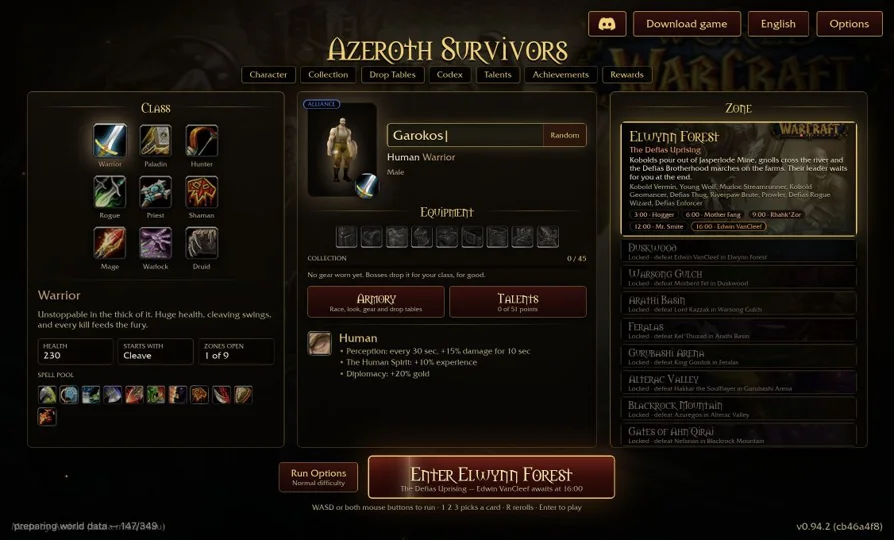
The v0.95.0 menu reviewed on October 16 lists Warrior, Paladin, Hunter, Rogue, Priest, Shaman, Mage, Warlock and Druid. Read each class description in that menu before selecting Play. The names are familiar, but they do not establish that every skill behaves like the corresponding World of Warcraft class. Older guides describe different versions and statistics. We do not turn those older numbers into a current strength ranking: choose the control style you prefer, then compare the current skills and upgrades offered during your run.
Controls and the first card choice
The reviewed menu shows WASD or both mouse buttons for movement, the number keys 1, 2 and 3 for card choices, R for rerolls and Enter to play. Follow the current on-screen prompts if they differ. Choose a class before treating a stationary menu as an input failure. Click inside the game window to give it focus. Maximizing the surrounding player changes its size; it does not itself click the game, choose a class or guarantee mouse capture.
WebGPU and first loading
The source explicitly checks WebGPU support. Use a current supported browser and compatible graphics hardware. The first visit prepares many assets, so an advancing download counter needs time. A class-selection menu is evidence that the engine opened; it is not a full campaign or performance test. If a blank window persists, compare the same project in its original tab. Avoid repeatedly restarting a progressing load. No game archive from your own commercial installation is requested by the reviewed opening flow.
Keep the project and the bookmark separate
The RadiantGames shelf saves a route on this browser and device. Game progress belongs to the source project. Check its current save or export controls before clearing browser data, switching profiles or opening a different build. A copied launcher URL does not carry a survival run. For a different next session, Diablo shareware offers a mouse-led RPG route; QuakeWorld offers an arena. These are alternatives in the directory, not claims that they share Azeroth characters or progression.
Project source: wow.aethus.pl ↗.
Compare WASM Arcade · PC games ported to browser · All game projects